Think of a good software design document template as the architectural blueprint for your project. It's the critical document that prevents scope creep and gets your entire team pulling in the same direction. This is how you transform a collection of great ideas into a solid, actionable plan, ensuring everyone is building toward the same finish line.
Why a Software Design Document Is Your Project’s North Star
Let's stop thinking of the software design document (SDD) as just another piece of paperwork. It's a massive strategic advantage. This isn't about bureaucracy; it's the map that guides your project from a rough concept to a successful launch, helping you sidestep the expensive rework that always happens when teams are running on assumptions.
When there's no central plan, projects are almost guaranteed to suffer from miscommunication. I've seen it happen time and again: crucial architectural choices get buried in Slack threads, requirements shift without anyone updating the docs, and engineers are left to guess what the product owner actually wanted. That kind of chaos is a direct path to blown deadlines and busted budgets.
Creating the Single Source of Truth
A well-crafted SDD becomes the undeniable single source of truth. It gives developers the confidence to build, knowing their piece of the puzzle fits perfectly into the bigger picture. For product managers, it offers a clear window into the technical strategy, making it far easier to track real progress and keep stakeholders happy.
This central hub of information is a game-changer for remote and async teams. Instead of being chained to back-to-back meetings just to stay aligned, team members can simply consult the SDD to get answers on:
- The core architecture and how all the different services talk to each other.
- The big design decisions and, just as importantly, the why behind them.
- Clear API specifications and data models.
- Any assumptions or constraints that might impact their work.
This level of clarity breeds autonomy and cuts down on friction, letting everyone contribute effectively, no matter what time zone they're in. A solid SDD creates a dependable record of progress, which is a cornerstone of any effective project management strategy.
A Practical Tool for Preventing Chaos
Imagine a team is building a new notification system. The backend dev assumes a simple on/off toggle. The frontend dev is already planning deep OS-level integrations. Meanwhile, the PM is picturing granular, per-channel controls. Without an SDD to get everyone on the same page, each person builds their own version of the feature. The result? Integration hell and weeks of wasted effort.
An SDD forces these conversations to happen before a single line of code is written. It exposes those misalignments early when the cost of changing course is just a few edits in a document, not weeks of recoding.
The explosive growth in software development only makes this kind of structured planning more critical. The U.S. Design, Editing & Rendering Software Publishing industry is on track to hit $25.0 billion in revenue by 2025. According to industry data from IBISWorld, this boom underscores the need for processes that bring order to increasingly complex projects. Using a software design document template provides exactly that structure.
Bringing Your Software Design Document to Life
Alright, this is where the rubber meets the road. A software design document template is just a file until you start turning abstract ideas into a concrete technical plan. This is the moment you translate project goals into a clear roadmap for your engineers.
I'm going to walk you through the key sections of our template, but I'll do it with practical advice and real-world examples you can actually use. The goal here isn't to write a massive, rigid encyclopedia that no one reads; it's to create a living document that genuinely guides the development process. Let's dig in.
Nailing the Project Overview and Goals
Every solid technical plan begins with a simple, powerful "why." This section isn't just filler, it sets the entire context for every single technical decision that follows. It's where you briefly explain the problem you’re solving and what success looks like.
Think of it as the elevator pitch for the engineering team. Someone jumping onto the project mid-way should be able to read this and immediately get what you're trying to achieve.
- Problem Statement: Be specific about the pain point. For example, "Our users can't easily track their contributions for performance reviews because their work is scattered across multiple tools."
- Proposed Solution: Describe the "what" at a high level. "We're building an 'AI-Powered Monthly Summary' feature that automatically generates a concise report of a user's logged activities."
- Key Goals: Make them measurable. Something like, "Cut down the time users spend prepping for performance reviews by 50%" or "Boost user engagement with our reporting features."
Getting this part crystal clear ensures every line of code serves the project's core mission.
Mapping Out the System Architecture
The system architecture section is the visual heart of your document. It's where you show, not just tell, how all the pieces will fit together. A simple, clean diagram beats pages of dense text every single time. Your aim is to communicate the flow of data and how different components interact without drowning your audience in details.
You don't need to be a UML guru to make a great diagram. A straightforward box-and-arrow chart is often all you need to illustrate the main services and their relationships.
Example: A New Notification Service
Let's say you're designing a service to handle user notifications. Your diagram might show something like this:
- An API Gateway takes requests from the front-end app.
- It forwards them to a dedicated Notification Service (a microservice).
- This service checks a User Preferences Service to see how the user wants to be notified.
- It then drops a message into a Message Queue (like RabbitMQ or SQS).
- Finally, different Worker Services (for email, SMS, etc.) pick up messages from the queue and send them out.
This simple flow clearly lays out the system's structure and dependencies. Any engineer can look at that and immediately understand their piece of the puzzle.
Defining Your Data Models
Your data models are the blueprint for the information your system handles. This is a make-or-break section because it directly affects how data is stored, retrieved, and used. Get this right early, and you'll save yourself from some seriously painful database migrations down the line.
To keep things clear, define your key entities, their attributes, and how they relate to one another. Sticking with our AI summary feature, the central data model might be a MonthlySummary.
Here's how you could define that in a way that leaves no room for confusion:
CREATE TABLE MonthlySummaries (
summary_id UUID PRIMARY KEY,
user_id UUID NOT NULL,
month DATE NOT NULL,
generated_summary TEXT,
status VARCHAR(20) DEFAULT 'pending', -- e.g., pending, complete, failed
created_at TIMESTAMP WITH TIME ZONE DEFAULT CURRENT_TIMESTAMP,
updated_at TIMESTAMP WITH TIME ZONE DEFAULT CURRENT_TIMESTAMP,
FOREIGN KEY (user_id) REFERENCES Users(user_id)
);
This snippet is totally unambiguous. It defines the table name, columns, data types (UUID, TEXT, etc.), and relationships. There's no guesswork, ensuring everyone is building on the same data foundation. Defining this inside your software design document template gives both backend and frontend developers a stable source of truth.
Specifying Your API Endpoints
Clear API specs are the bedrock of smooth collaboration between frontend and backend teams. This part of the design doc should act as a contract, detailing exactly how different systems will talk to each other. A good endpoint definition includes the path, HTTP method, any parameters, and example responses for both success and failure.
Think of your API specification as a firm contract. It allows for parallel work. Your frontend team can start building against a mock API based on this document while the backend team implements the real logic. This simple practice can shave weeks off your development timeline.
Let's spec out an endpoint for fetching a user's monthly summary.
GET /api/v1/summaries/{user_id}/{month}
- Description: Fetches the generated AI summary for a specific user and month.
- Method:
GET - URL Parameters:
user_id(UUID): The unique identifier for the user.month(String, YYYY-MM format): The month for the requested summary.
- Success Response (200 OK):
{
"summary_id": "a1b2c3d4-e5f6-7890-1234-567890abcdef",
"user_id": "f0e9d8c7-b6a5-4321-fedc-ba9876543210",
"month": "2024-10",
"status": "complete",
"generated_summary": "In October, you completed 15 tasks across 3 projects. Key achievements include launching the 'New Dashboard' feature and resolving a critical performance bug in the API..."
} - Error Response (404 Not Found):
{
"error": "Summary not found for the specified user and month."
}
This level of detail leaves nothing to chance. It’s a clean, actionable blueprint.
Addressing Non-Functional Requirements
Finally, a truly solid design document looks beyond just the features. Non-functional requirements (NFRs) define the qualities of the system, things like performance, security, and reliability. If you ignore these, you risk building a product that technically works but ultimately fails to meet user expectations.
Documenting NFRs forces you to confront these critical aspects from the start. This section should just be a list of clear, measurable statements. For teams that think in terms of user needs, our guide on crafting a user story template offers a great framework for framing these requirements.
Here are a few categories to consider when defining your NFRs:
| Category | Example Requirement |
|---|---|
| Performance | The GET /summaries API endpoint must respond in under 200ms. |
| Scalability | The system must handle 1,000 summary generation requests per minute. |
| Security | All user data must be encrypted at rest and in transit. |
| Reliability | The notification service must maintain 99.95% uptime. |
By working through each of these sections in your software design document template, you build a comprehensive and actionable plan. The document evolves from a simple list of requirements into the project's central brain, guiding your entire team toward a successful launch.
A Real-World Software Design Document Example
Theory is great, but nothing beats seeing a plan in action. To make this all feel a bit more concrete, let's walk through an example.
Imagine we're building a new feature for a project management tool called WeekBlast. The feature is "AI-Powered Monthly Summaries." We'll use our template to show exactly how a simple user need gets translated into a detailed, actionable technical plan. This finished document will give you a solid benchmark for what you should aim for.
Project Overview and Goals
This is where you set the stage. The goal here is to get everyone on the same page about what we're building and why before a single line of code is written. Keep it short, sweet, and to the point.
The Problem: We've noticed that our users, especially managers and top performers, are spending way too much time cobbling together their monthly achievements for performance reviews. They're manually digging through old tasks and project updates, which is a tedious and error-prone process.
The Solution: We're going to introduce "AI-Powered Monthly Summaries." With a click, the feature will analyze a user's activities in WeekBlast for any given month and spit out a clean, narrative-style summary of their biggest wins.
Business Goals:
- We want to see a 25% jump in user engagement with our reporting features within three months of launch.
- This feature should save our users a ton of time, giving them a sticky, high-value reason to stick with WeekBlast.
- An AI-driven feature like this will help us stand out from the competition.
System Architecture Breakdown
Okay, let's get a little more technical. Instead of writing a wall of text, a simple diagram or a clear flow is often the best way to show how all the pieces of the puzzle fit together. The aim here is clarity, not a brain-meltingly complex diagram.
For our AI Summaries, the flow looks something like this:
A user kicks things off by requesting a summary from inside the WeekBlast app. That request travels from the frontend to our main API Gateway, which acts as the traffic cop.
From there, the gateway knows to route this specific request to a brand-new microservice we'll build, the Summary Generation Service. This keeps the new logic neatly contained instead of cluttering up our main application.
This new service then has to do some homework. It queries our main WeekBlast Database to pull all the user's completed tasks, comments, and other activities for the requested month. Once it has all that raw data, it bundles it up and sends it over to an external Large Language Model (LLM) API, along with a very specific prompt we've engineered to get the right kind of summary back.
The LLM does its magic and sends back the generated text. Finally, our Summary Generation Service saves this new summary in our database (so we don't have to generate it again) and passes it back to the user's screen.
Data Model and API Specifications
Now that we have the high-level flow, it's time to get into the nitty-gritty details. Defining the data structures and API contracts is crucial because it lets the frontend and backend developers work at the same time without stepping on each other's toes.
Data Model for MonthlySummary
First things first, we need a place to store these summaries. A new table in our database makes the most sense.
CREATE TABLE MonthlySummaries (
summary_id UUID PRIMARY KEY,
user_id UUID NOT NULL,
month DATE NOT NULL,
summary_text TEXT,
status VARCHAR(20) DEFAULT 'pending',
created_at TIMESTAMP WITH TIME ZONE DEFAULT CURRENT_TIMESTAMP,
updated_at TIMESTAMP WITH TIME ZONE DEFAULT CURRENT_TIMESTAMP,
FOREIGN KEY (user_id) REFERENCES Users(user_id)
);
This little block of SQL leaves no room for interpretation. Everyone on the engineering team knows exactly what the data looks like, what's required, and how it connects to our existing Users table.
API Endpoint for Retrieving a Summary
Next up is the API "contract." This is how the frontend will ask for and receive the summary data from the backend.
GET /api/v1/users/{user_id}/summaries/{month}
- Description: Fetches the AI-generated summary for a specific user and month (formatted as YYYY-MM).
- Method:
GET - Success Response (200 OK): When everything works, the frontend can expect to get a JSON object that looks exactly like this.
{
"summary_id": "a1b2c3d4-e5f6-7890-1234-567890abcdef",
"user_id": "f0e9d8c7-b6a5-4321-fedc-ba9876543210",
"month": "2024-10",
"status": "complete",
"summary_text": "In October, you shipped the 'New Dashboard' feature and closed 12 high-priority tickets. Your main focus was on improving API performance, resulting in a 15% reduction in latency."
} - Error Response (404 Not Found): If no summary exists, we'll send back a clear error.
{
"error": "Summary not found for the specified user and month."
}
This example is all about showing how a good software design document template takes a feature from a simple idea to a concrete engineering plan. Each section logically builds on the last, creating a single source of truth that keeps the entire team aligned and moving fast.
Keeping Your SDD Relevant in Agile and Async Workflows
A great software design document is a living guide, not a static artifact that gathers digital dust after kickoff. For it to stay useful, it has to keep up with the fast pace of modern development, especially for agile and async teams. The real goal is to build simple, lightweight processes that give everyone visibility without bogging the team down in red tape.
The old model of writing a massive design document upfront and treating it like gospel just doesn’t fly anymore. In today's world, a design doc serves its purpose best when it evolves right alongside the codebase. It should always reflect the current state of the project, not what it looked like six weeks ago.
This flow chart gives you a sense of that core iterative loop, from the initial high-level overview to nailing down the architecture and APIs.
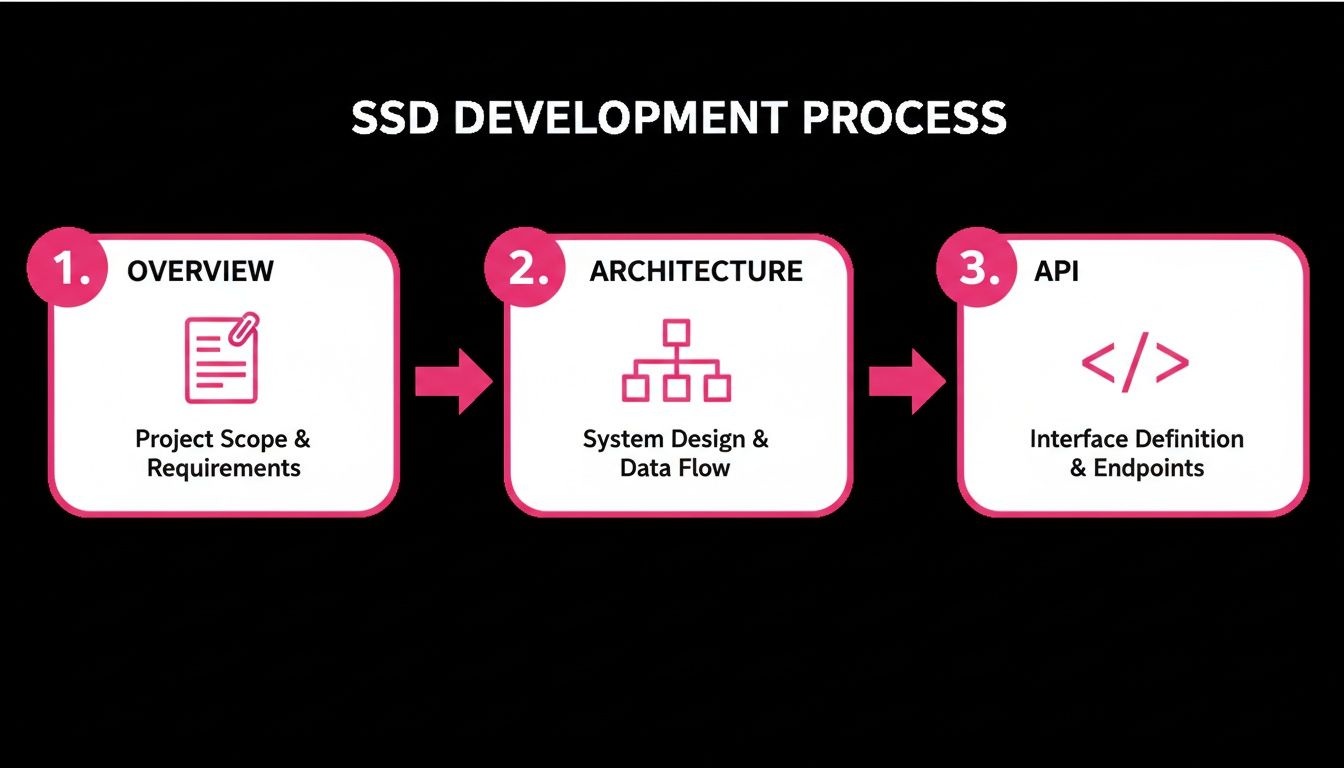
Think of it as a continuous cycle of refinement. Each phase builds on the last, which is exactly what you need to keep the document from becoming obsolete.
Embracing Lightweight Version Control
One of the simplest yet most powerful habits you can build is treating your SDD like code. Storing it in a version control system like Git, right next to the project's source code, is a total game-changer. This simple move immediately gives you a clear, chronological history of every single change.
When a major architectural decision is made, the update to the SDD can be bundled into the same pull request as the code changes. This practice creates an unbreakable link between the "what" (the code) and the "why" (the documentation).
Now, reviewers see the full context in one place. They aren't just approving a chunk of code; they're approving the logic behind it, which ensures the documentation stays perfectly in sync with what’s actually being built. It’s a tiny process shift with a huge payoff in clarity and long-term maintainability.
Managing Asynchronous Feedback Cycles
For remote and distributed teams, waiting for a real-time meeting to review design changes is a massive bottleneck. The SDD is the perfect tool for getting around this, letting you gather feedback efficiently across different time zones. To dig deeper into this, check out our guide on how to handle async updates effectively.
To make this work smoothly, you need to establish some ground rules for giving feedback directly in the document. Here are a few things I’ve found work well:
- Use Comments and Suggestions: Tools like Google Docs or Confluence are built for this. Encourage your team to drop comments with questions or use the "suggesting" mode to propose specific wording changes.
- Set Clear Deadlines: When you share a doc for review, give a firm deadline (e.g., "Please add all comments by EOD Friday"). This creates a little urgency and keeps the review process from dragging on forever.
- Assign an Owner: Every major section of the SDD should have a designated owner. This person is responsible for chasing down feedback, addressing comments, and officially merging the approved changes.
This kind of structured approach turns the feedback process from a chaotic mess of Slack messages into an organized, actionable conversation.
Creating a Decision Log
Not every little change or discussion needs a full-blown update to the main SDD. For smaller tweaks or debates about architecture, adding a "Decision Log" or "Architecture Decision Record" (ADR) section can be incredibly helpful. This log acts as a simple, searchable history of key choices made along the way.
A Decision Log answers the critical question, "Why on earth did we decide to do it this way?" It captures the context, the other options we considered, and the final rationale. This becomes invaluable for future team members trying to get up to speed on the project's history.
Each entry in the log should be short and sweet. For instance, an entry might cover the decision to switch from one database to another, quickly outlining the performance benchmarks and trade-offs that led to the change. This searchable history is the perfect companion to the formal document, providing a clear record of who contributed what and how the project has evolved.
Common SDD Mistakes That Derail Projects
Even with the best software design document template in hand, things can still go completely sideways. The document itself isn't a magic wand; it's the thought process and the ongoing collaboration behind it that really matter. I've seen a few common, yet totally avoidable, mistakes turn a promising SDD into a source of confusion instead of clarity.
Learning to spot these pitfalls is just as crucial as knowing what to put in the document in the first place. If you can sidestep these common traps, you'll create documentation that actually helps your team build better software, rather than becoming a dusty artifact nobody trusts.
The Overly Detailed Masterpiece
One of the most frequent mistakes I see is the attempt to document every single, minute detail right from the get-go. This is what I call over-engineering the document. It results in a massive wall of text that's overwhelming to read and, frankly, impossible to keep up-to-date. Engineers get bogged down in tiny implementation specifics before the core architecture is even locked in.
A good SDD should be a guide, not a straightjacket. It’s there to define the high-level architecture, the essential data models, and the API contracts, the big-picture stuff. It should leave plenty of room for developers to make smart implementation decisions on their own.
The goal is to provide enough structure for consistency and alignment, not to micromanage every line of code. Focus on the "what" and the "why," and trust your engineering team to own the "how."
Nailing this balance is key to keeping your team agile and actually wanting to use the document.
The "Write and Forget" Document
Another classic blunder is treating the SDD as a one-and-done task you check off before a single line of code is written. The reality is, the moment development starts, you gain new insights. Unexpected technical challenges pop up, and requirements get refined. If the SDD isn't updated to reflect these on-the-ground realities, it quickly becomes outdated and, even worse, dangerously misleading.
An SDD that doesn't match the actual codebase is more harmful than having no document at all. It creates a false source of truth that trips up both current team members and anyone who joins the project later.
Here’s how you fight this: weave documentation updates into your regular development rhythm.
- Sprint Reviews: Take just five minutes during sprint reviews or planning meetings to ask, "Did anything we did this sprint make the SDD inaccurate?"
- Pull Requests: Create a culture where engineers are encouraged to bundle small documentation tweaks into their pull requests whenever a code change affects the agreed-upon design.
Ignoring the Real Audience
Finally, a trap many of us fall into is writing the design document for ourselves. We use our own shorthand, gloss over crucial context that's obvious to us, and assume the reader shares our exact background knowledge. This completely misses the point of creating the document in the first place.
Remember, your SDD is a communication tool for a whole range of people:
- Your fellow engineers who need to build components that interact with your design.
- QA engineers who depend on it to write solid test plans.
- Future developers who will have to maintain or extend the system years from now.
- Product managers who need to grasp the technical approach at a high level.
This need for clear communication is a major driver behind the growth of the Engineering Design Software market, which is projected to surge with a robust CAGR from 2025 to 2033. At its heart, a good software design document template tackles a critical business problem head-on; studies show that projects without structured docs face up to 30% higher failure rates due to simple miscommunication. You can get more details by reading the full research on the Engineering Design Software market.
Always write with empathy for your audience. Explain concepts clearly and ditch the jargon whenever you can, it's one of the easiest ways to prevent these costly misalignments.
Your Top Questions About Software Design Docs, Answered
Even with a great template, diving into software design documents for the first time can bring up a few questions. I've heard these come up time and again, so let's clear the air on the most common ones.
How is a Software Design Document Different from a PRD?
This is probably the most frequent question, and the distinction is super important. Think of it like this: a Product Requirements Document (PRD) is all about the "what" and the "why" from a user's perspective. It describes the user stories, what the business hopes to achieve, and the problem we're solving for the customer.
An SDD, on the other hand, is the engineering team's answer to "how." It’s the technical blueprint. It gets into the nitty-gritty of the architecture, the data models, API contracts, and the nuts and bolts of the implementation plan. The PRD is the client's vision; the SDD is the architect's plan to actually build the thing.
Do Agile Teams Really Need an SDD?
Yes, absolutely. I know what you’re thinking, agile is about working software over comprehensive documentation. But a modern SDD isn't some dusty, waterfall-era artifact. For an agile team, it’s a living document that keeps everyone on the same page, especially when working remotely.
It’s where you capture crucial architectural decisions and define how different parts of the system will talk to each other. This prevents a ton of technical debt down the line and makes it way easier for new engineers to get up to speed. They can read the SDD instead of trying to piece together the system's logic from thousands of lines of code.
An SDD in an agile world isn't a rulebook carved in stone. It's a lightweight guide that evolves as you build, keeping the technical vision clear without killing your momentum.
What are the Best Tools for Managing SDDs?
Honestly, the best tool is the one your team will actually use every day. There's no magic bullet, but a few platforms are consistently great for handling a software design document template.
- Confluence: If your team is already living in the Atlassian world, this is a no-brainer. Its templates and tight integration with Jira make it incredibly powerful for tracking design decisions alongside development work.
- Google Docs: You can't beat its simplicity and real-time collaboration. For getting quick, async feedback from the team through comments and suggestions, it’s fantastic.
- Notion: This is a great pick if you want something more flexible. You can link your design docs directly to tasks, meeting notes, and other project artifacts, creating a true all-in-one workspace.
When it comes to diagrams, my go-to's are Lucidchart, Miro, or even the simple text-based Mermaid.js. The goal is to choose a tool that makes collaboration easy, not one that adds another layer of complexity.
Stop losing track of your hard work. WeekBlast is a high-speed work log that replaces tedious status meetings with a simple, searchable changelog. Capture your wins in seconds and give your team the visibility they need without the interruptions. Start your free trial at WeekBlast.


